
Clicks Technology made waves at CES 2024 with its Clicks Keyboard that provides a throwback BlackBerry-like physical keyboard experience for the latest touchscreen smartphones. This year, the company is launching two new products: the Clicks Communicator and Clicks Power Keyboard.
Clicks Communicator is a Phone Companion

The Clicks Communicator is a smartphone itself, but it’s designed to complement your existing device versus replace it. The idea is for it to function as a second phone that helps you create healthier boundaries with technology, prioritizing communication over consumption and ultimately, distraction. Use it to reply to and send messages, the core function of a phone, and leverage your primary device for things like entertainment and content capture.
Jeff Gadway, Chief Marketing Officer at Clicks, likens the Communicator to what a Kindle is to an iPad. It focuses on context, input, and control via a compact, tactile design. For some, it might be all you need and thus a viable primary phone option, too. Indeed, it functions like a simple phone with Android 16 and five years of security updates, global 5G, 4G LTE, and 3G/2G support along with a 4,000mAh silicon-carbon battery, 50MP main camera with optical image stabilization (OIS) and 24MP front camera, NFC with Google Play, Bluetooth 5.4, Wi-Fi 6, and USB-C and wireless charging. It has a 3.5mm headphone jack, tactile key switch that is configurable for airplane mode, 256GB storage that’s expandable up to 2TB via optional microSD card, and physical SIM tray and eSIM compatibility.

A Signal light surfaces messages and you can customize it with different colour and light patterns that correspond to specific people, groups, or apps. The Signal is integrated into the side-mounted Prompt Key as well, so it remains visible whether the phone is face up or down.
Clicks has partnered with Niagara Launcher, an Android launcher with over 12 million downloads, to co-develop a streamlined software experience focused on triage and action. Messages from apps like Gmail, Telegram, WhatsApp, and Slack are curated directly on the home screen, allowing you to review and respond quickly without navigating multiple apps.
The phone has a physical keyboard with larger, ergonomically contoured keys for fast typing. The keyboard is also touch-sensitive, enabling smooth scrolling through messages, lists, and web pages without reaching for the touchscreen. For voice-first communications, the dedicated Prompt Key starts speech input. Press and hold to dictate a message, release to send. Outside of text fields, the same key begins a voice recording.

Looking ahead, the Prompt Key is designed as a platform for future collaborations with AI-powered applications (including note takers, voice recorders, and intelligent agents) enabling new ways to capture, process, and act on information.
Measuring just 131.5 mm tall and weighing 170 grams, Clicks Communicator is designed to fit comfortably in a pocket while feeling balanced in hand. It has an elevated display and contoured chin to improve ergonomics while protecting the keyboard. There’s also a sloped back cover with chamfered edges. It supports applications built on the Android Strongbox API, enabling secure storage and hardware-backed encryption.
Clicks Communicator will be available in Smoke, Clover, and Onyx, and includes variety of interchangeable back covers for personalization. Reserve one before February 27, 2026 by paying a US$199 deposit, with availability beginning later this year for a total price of US$399. This includes two additional back covers.
Clicks Power Keyboard is a Level Up for Multi-Device Use
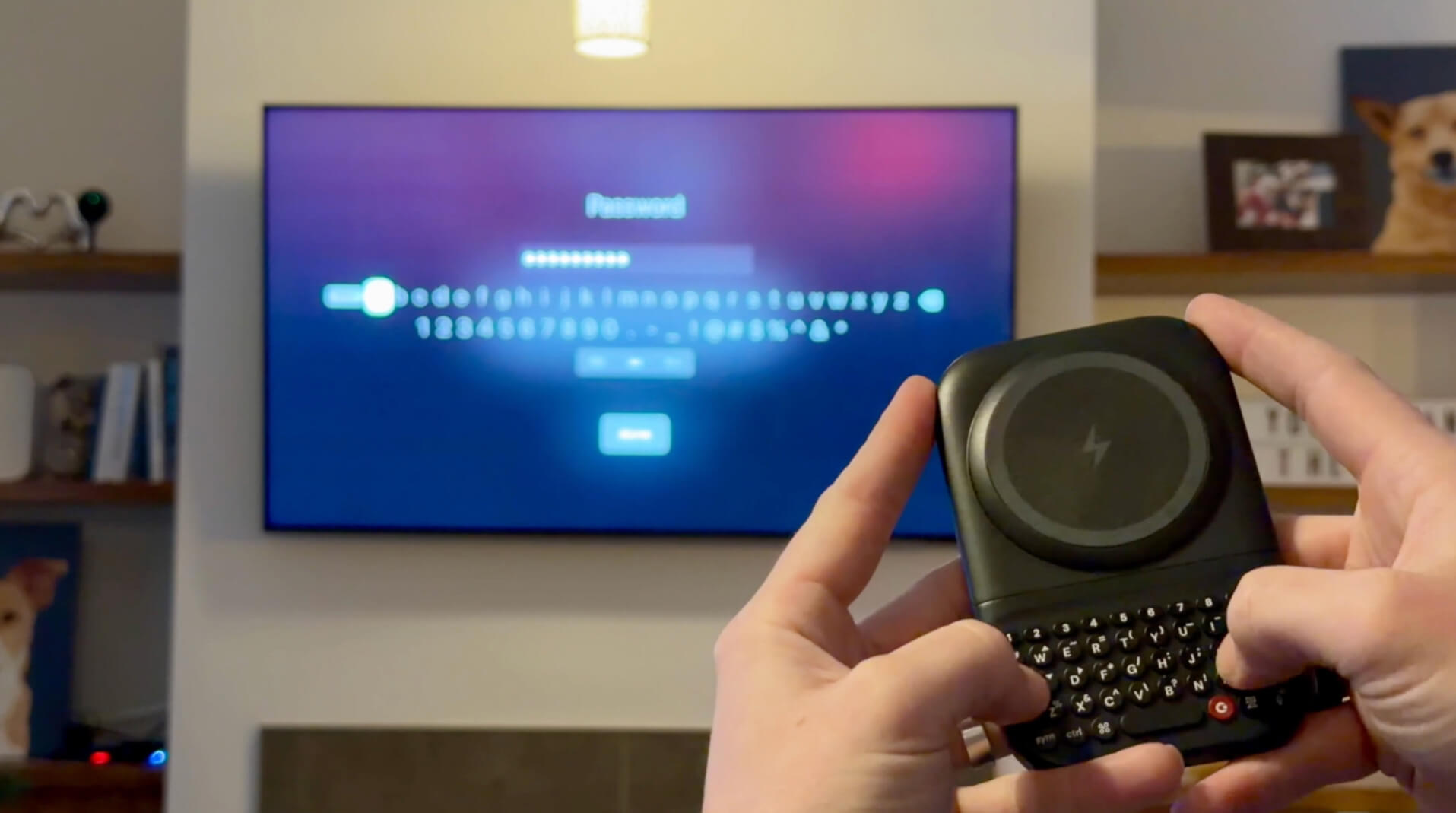
As a successor to the Clicks Keyboard Case, the Clicks Power Keyboard is a compact keyboard that offers a premium typing experience for touchscreen devices, including smartphones, tablets, even smart TVs. While the Clicks Keyboard was designed specifically for Apple iPhone, Google Pixel and other Android phones, and Motorola Razr devices, the Clicks Power Keyboard extends support to more devices, making text input for everything from passwords to credentials simpler.
Clicks Power Keyboard attaches to smartphones using a strong MagSafe or Qi2 magnetic connection and can be used with existing cases. By moving typing off the touchscreen, Power Keyboard frees up valuable screen space normally consumed by on-screen keyboards. Familiar keyboard shortcuts supported by iOS and Android carry over seamlessly, making it easier to launch apps, navigate interfaces, and respond quickly on the go.

Multiple slider positions allow the compact keyboard to adjust to different phone sizes, from standard models to large “Ultra” and “Pro Max” devices, while landscape rotation enables more comfortable editing of documents, spreadsheets, and e-mails.
Paired with a tablet, it provides a practical typing solution without the bulk of a full-size keyboard, ideal for working on a plane, at a café, or in-class. Connected to a smart TV, Power Keyboard replaces frustrating on-screen keyboards and remotes. In AR and VR environments, Power Keyboard delivers tactile feedback that enables more confident input as well.
Clicks Power Keyboard features ergonomically shaped keys with optimized key pressure, an intuitive QWERTY layout, directional keys, and a dedicated number row, making tasks like entering phone numbers or editing spreadsheets faster and more precise.

Power Keyboard has a built-in 2,150 mAh battery that powers the keyboard itself and as a bonus, can wirelessly top up a smartphone via MagSafe or Qi2 charging. You can pair the keyboard with multiple devices at once and easily switch among Bluetooth profiles using a simple keyboard shortcut. The keyboard can also be customized using the Clicks app, available on iOS and Android. The app enables personalization of settings such as key behaviour, backlighting, and typing preferences.
Pre-orders are available now for the Clicks Power Keyboard, and it will be officially on sale in the spring. Early bird pricing is US$79 and the regular MSRP is US$109.